Document Processing Toolkit
One Python Agent API over Anthropic, OpenAI, Google Gemini and Fireworks, built for document and
multimodal workflows: tool calling through decorated functions, MCP servers and provider built-ins,
structured output, streaming, hooks that can veto or pause a run, sessions that move between
providers, and a cost record for every request. Models are rows in a data-only registry, so a new
model is a data change, not a code change.
Source access
The source repository is currently private. To request access, message
Rounak Zoeb on LinkedIn with your GitHub
username. The companion tool servers, doc-processing-std-tools, are documented at
https://doc-processing-std-tools.vercel.app/.
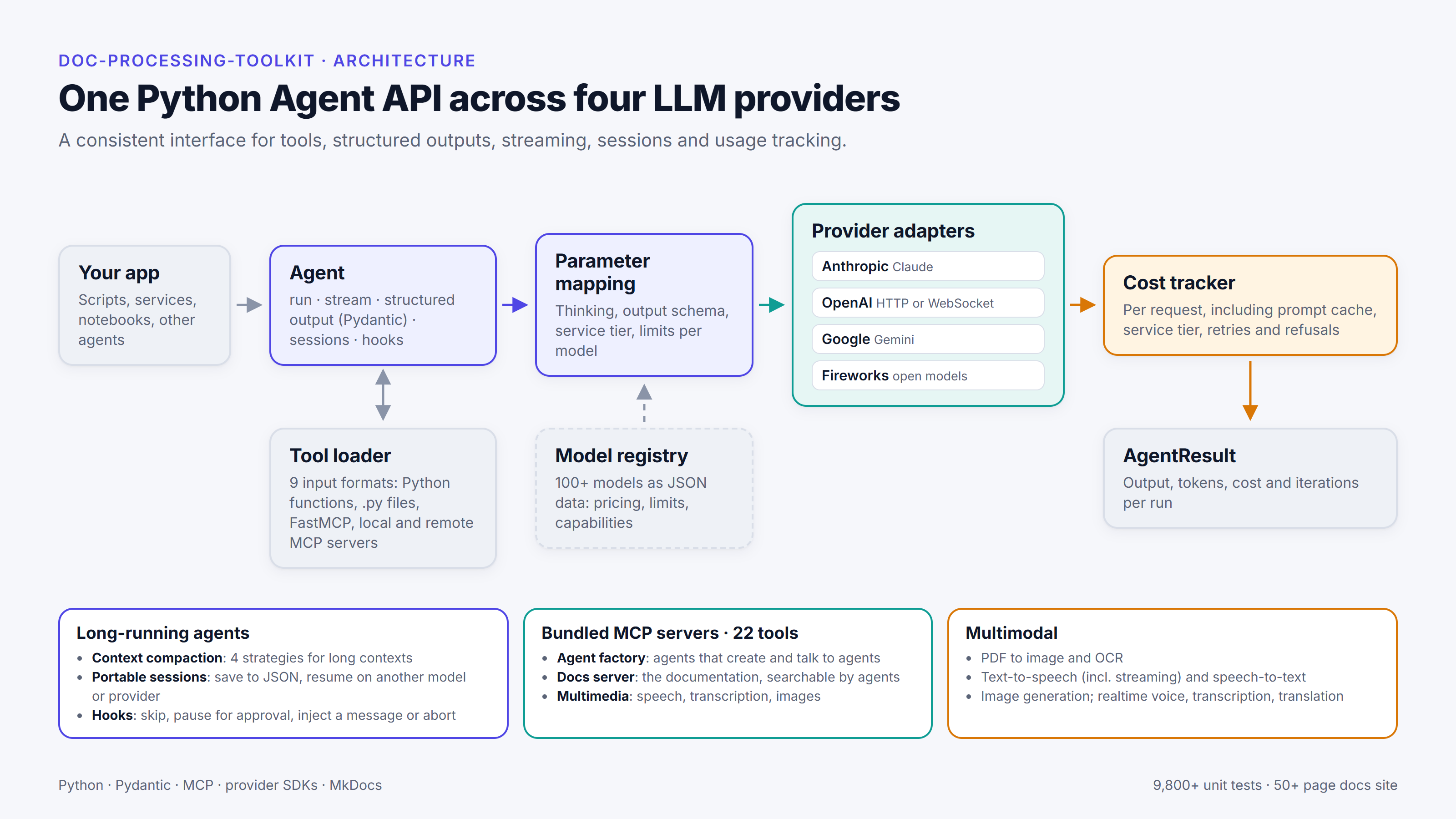
Figure: the toolkit's layers, from the Agent entrypoint down to the provider SDKs.
A first run
from doc_processing_toolkit import Agent, tool

@tool
def word_count(text: str) -> int:
    return len(text.split())

agent = Agent(
    model="claude-sonnet-5-5",  # or "gpt-6-luna" or "gemini-3.8-flash"
    instructions="Answer from the document; use tools when they help.",
    tools=[word_count],
)
result = agent.run_sync("How long is the executive summary, in words?", files=["report.pdf"])
print(result.output)
print(f"{result.input_tokens} in / {result.output_tokens} out, ${result.cost:.4f}")
The same code runs on every provider whose row accepts the input: swap the model id and the registry
supplies the routing, the request shape and the prices. This example attaches a PDF, which the
Anthropic, OpenAI and Google rows accept and the Fireworks rows (text, and on seven of them images)
do not; each row's input_types in the registry say what it takes. The Quickstart
has the install steps and the streaming and tool-calling variants.
Key Features
- Provider-agnostic agents — supports OpenAI, Anthropic, Google (Gemini), and Fireworks
- Streaming — real-time output via
Agent.stream()with text, thinking, and tool call events - Tool calling — decorated functions, MCP servers, and built-in provider tools
- Hooks and steering — an awaited control channel that can veto a tool call, inject a message mid-run, pause for confirmation, or abort a run cleanly
- Sessions — multi-turn conversation state management, checkpointed to a versioned JSON
envelope with
to_json()/from_json()(media inline, in a store, or stripped) and resumable under another model or another provider (History and Checkpointing) - Context compaction — pre-call and intra-run history compaction with four strategies
- Cost tracking — per-request and per-iteration token and cost metrics, including prompt-cache and retry cost tracking
- Prompt caching and service tiers — opt-in Anthropic
cache_controlbreakpoints, automatic caching on the other providers, andservice_tier="priority"/"flex"/"ultrafast"billed at the tier that actually served each request - OpenAI WebSocket transport — opt-in
Agent(openai_transport="websocket")runs an OpenAI agent's tool loop over one WebSocket, with the same results, billing and retry behaviour as HTTP (OpenAI WebSocket Transport) - Structured output — Pydantic model–based response parsing
- Multimodal — image, audio, video, and PDF input support
- Multimedia — text-to-speech (including Gemini 3.8 TTS, and streamed speech that starts playing before the clip is finished), speech-to-text, and image generation/editing on OpenAI and Google, plus serialisable multi-turn image sessions
- Realtime sessions — provider-neutral speech-to-speech over OpenAI Realtime and Gemini Live, with visual input, and three dedicated session families beside it: live transcription, live translation, and OpenAI's duration-billed GPT-Live
What this documentation includes
- Concept docs for
Agent, tools, provider routing, sessions, cost tracking, and MCP usage. - Test-backed recipes sourced from
tests/e2eandtests/integration. - API reference generated with
mkdocstringsfrom thesrc/doc_processing_toolkitpackage.