MCP
This toolkit uses MCP (Model Context Protocol) in two ways:
- Consume MCP tools from local/remote servers in
Agent - Expose toolkit functionality as FastMCP servers —
docs_server,multimedia_server, andagent_factory
The toolkit's MCP servers assume a trusted host
agent_factory and multimedia_server are built to be driven by the operator's own assistant
over stdio. Their tool parameters reach host-level capabilities: create_agent /
create_agent_session accept tool paths (.py files are imported and executed), a YAML
config file path and stdio commands; multimedia_server reads any readable input path and
writes to any output_dir; the A2A session registry has no close tool, no cap and caller-chosen
ids. None of this is gated. Do not expose these servers to untrusted MCP clients or to a model
you do not control.
Tool consumption in Agent
Supported MCP-oriented formats include:
- FastMCP server object, bare or in the dict form
{"type": "fastmcp", "server": ...} - local MCP script config
- local MCP command config
- provider-native remote MCP server config
- pre-built MCP session config
- client-side remote MCP config
Concrete examples:
# FastMCP object, and the dict form that takes options
tools=[fastmcp_server]
tools=[{"type": "fastmcp", "server": fastmcp_server, "allowed_tools": ["add"]}]

# Local script
tools=[{"type": "mcp_script", "path": "tests/fixtures/sample_mcp_server.py", "name": "calculator"}]

# Command-spawned server
tools=[{"type": "mcp_command", "command": "python", "args": ["-m", "tests.fixtures.sample_mcp_server"], "name": "command-server"}]

# Remote streamable HTTP MCP, connected by the provider
tools=[{"type": "mcp", "server_label": "deepwiki", "server_url": "https://mcp.deepwiki.com/mcp"}]

# Pre-connected session
tools=[{"session": existing_mcp_session, "name": "calculator"}]

# Remote streamable HTTP MCP, connected by this process
tools=[{"type": "mcp_remote_client", "url": "https://mcp.deepwiki.com/mcp", "name": "deepwiki"}]
The last two rows are the two remote routes. {"type": "mcp", ...} hands the URL to the provider's
own connector (Anthropic, OpenAI, Fireworks). OpenAI's built-in connectors — a server given by
connector_id (Gmail, Google Calendar, …) instead of a URL — are rejected by the API on the GPT-6 rows
(gpt-6-astra, gpt-6.1-sol, gpt-6-sol, gpt-6-luna publish supports_openai_connectors: false, verified live
2026-09-23 and, for gpt-6.1-sol, 2026-10-01); a remote MCP server by URL works on them. {"type": "mcp_remote_client", ...} opens the session
from this process, so the tools execute client-side and work on every provider — Google included —
take the function-calling path, and are visible to hooks and tools_used. It is an explicit opt-in;
the provider-native format is unchanged.
Every format takes an allowed_tools list of the tool names to expose (0.5.1). The toolkit filters
the servers it runs; on the provider-native route OpenAI and Anthropic filter, and Fireworks, which
ignores the field, refuses it at construction. See
Choosing which tools a server exposes.
A FastMCP object attached in-process runs in this process: the toolkit calls the tools of the
SDK-bundled FastMCP and of fastmcp<3 itself, and a fastmcp>=3 server through its own public
call_tool. Since 0.5.3 a tool of the first kind is called through its own run. On the SDK-bundled
FastMCP that validates and coerces the arguments as the server does over stdio — an unknown argument
is dropped (before, it raised), a string is coerced to an annotated int, a pydantic-model parameter
arrives as the model instance, a value the schema rejects is an error result, and a tool that asks
for a Context receives one bound to the server, not to a request — ctx.fastmcp works, but
ctx.info(), ctx.report_progress() and the other request-bound methods raise the SDK's "not
available outside of a request" error and the call becomes an error result, since in-process there is
no client for them to reach; a fastmcp<3 tool's run validates by its own rules
(it rejects an unknown argument, as fastmcp>=3 does) and gets no toolkit-made context.
DPT_FASTMCP_VALIDATED_CALL=off restores the
direct fn(**arguments) call for a tool that relied on raw values. A synchronous tool function
runs on a worker thread (anyio.to_thread.run_sync), so a long call (an OCR pass, a LibreOffice
conversion) no longer stalls streaming, hooks and the loop's other tasks — a round's tool calls are
still awaited one after another;
DPT_FASTMCP_SYNC_TOOLS_OFFLOOP=off restores
the on-loop call. Since 0.5.1 a tool of the first kind that returns an image, audio or an MCP content object
(FastMCP's Image / Audio helpers, a TextContent, ImageContent or AudioContent, or a list
holding them, as std-tools' read_image, page renderers and screenshots do) is converted the way the
server's own call_tool converts it, so the image reaches the model as an image; before, it arrived
as the text <...Image object at 0x...> (a content object as its repr) and a model could invent a
description of a picture it never saw. Returned on their own, strings, dicts, lists of content dicts,
resource content, a pydantic model or table with a type field, and every other value are formatted
exactly as before (in a list next to an image, each becomes its own text item, as FastMCP does), and a
server run over stdio was never affected. A model that cannot
take images in tool results gets the usual "image omitted" notice.
Results of client-executed MCP tools — every row above except the provider-native one — are capped
by Agent(max_tool_result_chars=...) before they reach the model (by default a quarter of the
model's context window, 0 turns it off); see Tool-result size cap.
With Agent(truncated_result_read_chars=N) the model can read on past the cut with the built-in
read_truncated_result tool (see
Letting the model read past the cut).
A provider-native server's results never pass through this process and cannot be capped. When one
runs, result.built_in_tools_invoked contains "remote_mcp" on Anthropic, OpenAI and Fireworks
alike (Anthropic also lists the MCP tool's own name).
Session lifecycle
Local MCP sessions (scripts, commands, FastMCP objects, pre-built sessions) and client-side remote
sessions are opened once per Agent per event loop and reused by every run() and every
AgentSession turn until close(). close() keeps the server configs, so the next run reconnects,
and run_sync() connects and releases inside its own loop. Full rules — including why a pre-built
session stays async-only — are in Tools.
See Tools and Local MCP Tools recipe.
Docs MCP Server
A local stdio MCP server that gives AI agents structured access to the
doc-processing-toolkit documentation bundle.
Module: doc_processing_toolkit.mcp_servers.docs_server
Run:
python -m doc_processing_toolkit.mcp_servers.docs_server
Tools
| Tool | Purpose |
|---|---|
docs_get_overview() |
Package metadata, version, chunk count, topics grouped by kind |
docs_list_topics(tag?) |
Browse all chunk IDs, optionally filtered by tag |
docs_search(query, limit?, tag?) |
Keyword search with ranked results and snippets |
docs_get_chunk(chunk_id) |
Full markdown content of a single chunk |
docs_get_llms_full() |
Complete llms-full.txt for large-context ingestion |
docs_get_recipe(name_or_id) |
Retrieve a recipe page by name (fuzzy match supported) |
Prompts
| Prompt | Purpose |
|---|---|
create_agent_quickstart(provider, model) |
Step-by-step agent creation with chunk references |
troubleshoot_common_errors(error_text) |
Triage steps referencing relevant docs chunks |
update_docs_bundle() |
Instructions for regenerating the bundle |
Typical agent flow
- Call
docs_get_overview()to orient on available topics - Call
docs_search("session memory")to find relevant chunks - Call
docs_get_chunk(chunk_id)to read the full content
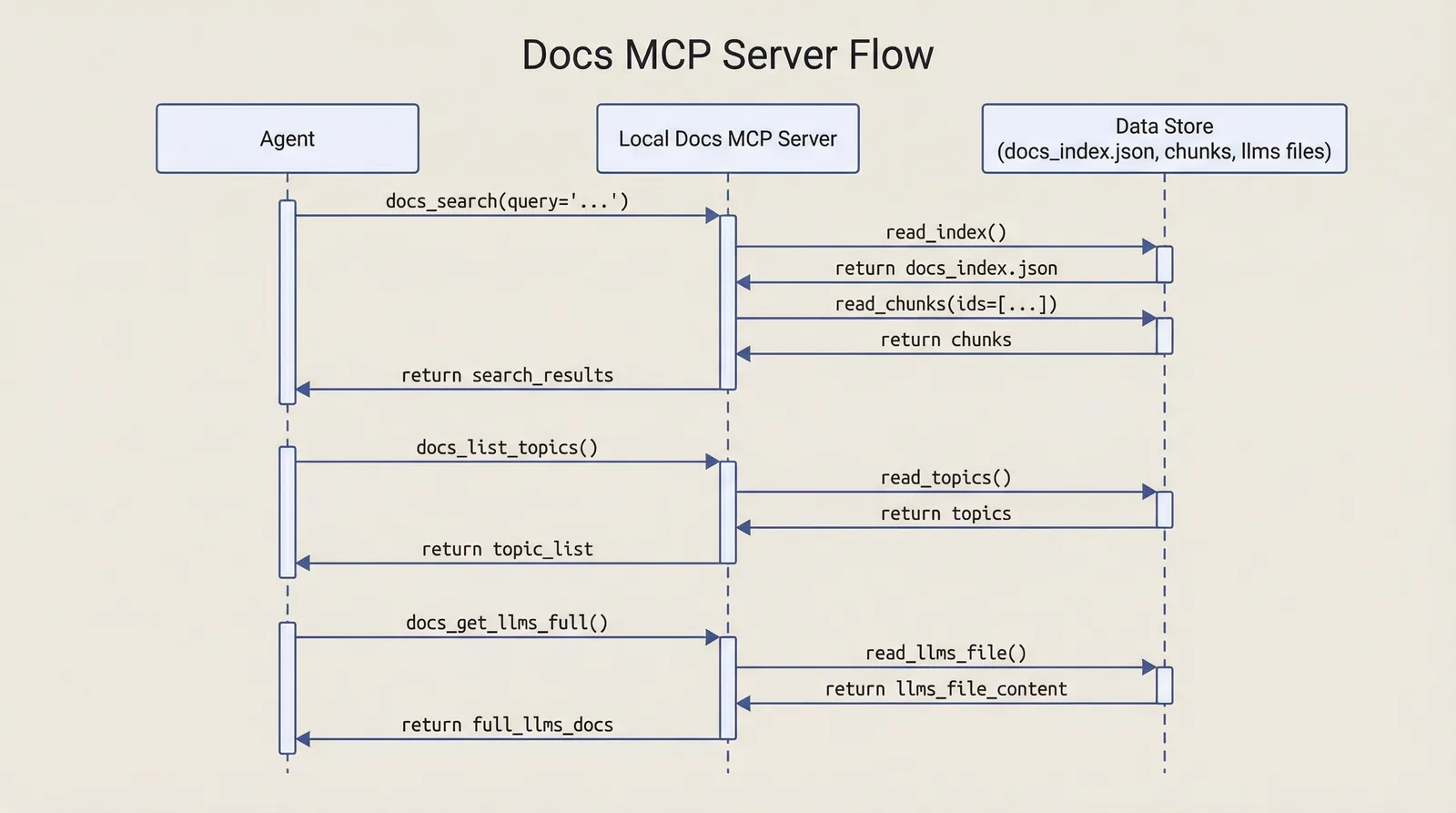
Figure: docs MCP server request/response flow.
VS Code registration example
Create .vscode/mcp.json in the client repository:
{
  "servers": {
    "doc-processing-docs": {
      "type": "stdio",
      "command": "python",
      "args": [
        "-m",
        "doc_processing_toolkit.mcp_servers.docs_server"
      ]
    }
  }
}
Notes:
- Requires this package installed in editable mode in the same environment.
- Use a Python interpreter where
doc_processing_toolkitis importable.
Multimedia MCP Server
doc_processing_toolkit.mcp_servers.multimedia_server exposes the toolkit's native multimedia
capabilities as MCP tools, so any agent that can call MCP tools can synthesize speech, transcribe
audio, and generate or edit images without importing the toolkit.
Run:
python -m doc_processing_toolkit.mcp_servers.multimedia_server
Multimedia tools
| Tool | Purpose |
|---|---|
synthesize_speech(model, text, ...) |
Text-to-speech on OpenAI and Google TTS models. custom_voice_id sends a custom voice ({"id": ...}: an OpenAI voice_... id, or on the Gemini 3.8 rows a designed, replicated or Extended Voice Library id) instead of voice; output_format="pcm" on a Google row is written as .pcm. The audio is written to a file, output_path |
transcribe_audio(model, audio_path\|audio_base64, ...) |
Speech-to-text: the OpenAI per-minute models, gemini-3.5-transcribe, and Gemini audio understanding. The transcript is in the result and also saved as JSON (text, segments, words), transcript_path; output_dir picks the folder |
generate_image(model, prompt, ...) |
Text-to-image generation. The images are written to files, paths |
edit_image(model, prompt, image_path\|image_base64, ...) |
Instruction-driven editing, with pixel masks on OpenAI. The images are written to files, paths |
image_size_for(model, ...) |
Solve a size the model accepts, with no API call |
Each tool is a thin wrapper over doc_processing_toolkit.multimedia. Option validation, provider
routing, and cost accounting all stay in that module, so every result carries cost and
cost_estimated on the same terms as a direct Python call. See Multimedia for the
underlying capability and its pricing schemas.
Every result that made a provider call also carries the _dpt_spend marker (0.5.1), so an agent that
calls these tools adds their cost to its own AgentResult.cost and session totals, and lists each call
in tool_reported_costs. An app that added these costs to the agent's cost itself now counts them
twice; see Tool-reported spend.
To give an agent only some of these tools, list them in allowed_tools. An app that speaks through
its own tool, for example, keeps the server's synthesize_speech out:
from doc_processing_toolkit.mcp_servers.multimedia_server import multimedia_server

tools = [
    speak,  # the app's own speech tool
    {"type": "fastmcp", "server": multimedia_server, "allowed_tools": ["generate_image", "edit_image"]},
]
# Over stdio the key goes in the script config instead:
# {"type": "mcp_command", "command": "python",
#  "args": ["-m", "doc_processing_toolkit.mcp_servers.multimedia_server"],
#  "name": "multimedia", "allowed_tools": ["generate_image", "edit_image"]}
The image tools take every named parameter their Python twins take, field for field —
background, output_format, output_compression, timeout, aspect_ratio, thinking_level (the
Gemini image rows), and on edit_image also quality, n and input_fidelity. transcribe_audio takes duration_seconds, plus the full
speech-to-text option set — custom_vocabulary_json, mode, languages_json, keywords_json and
stream — and runs the identical registry gating and incompatibility checks, so an option the model
cannot take is refused here exactly as it is in Python. Results carry error_code and retryable
alongside error; image results carry input_tokens, output_tokens and cost_breakdown, and
transcription results carry input_tokens, output_tokens and converted_from — so a calling agent
sees exactly what a Python caller sees.
image_size_for returns {size, model, error, error_code, retryable} and makes no provider call, so
an agent can size an image before deciding whether to pay for one.
Files, not base64
Since 0.5.1 these tools write their output to files and never return base64. Base64 inside a tool
result is of no use to a model, which can neither hear audio nor see an image that way, and it floods
the context: a 10-second Google WAV is about 640,000 base64 characters. So synthesize_speech,
generate_image and edit_image always write the file and return its path (output_path, paths),
and transcribe_audio saves a copy of the transcript (transcript_path) while keeping the text in
its result, because the text is what the model usually needs.
The folder is, in order:
- the call's
output_dir(the model can pass one); DPT_MULTIMEDIA_OUTPUT_DIR;<system temp>/doc_processing_toolkit/multimedia, created on first use. On Linux and macOS, where/tmpis shared by every user, it isdoc_processing_toolkit-<uid>/multimedia, created private to the user (mode 700). Each of the two components is refused if it exists as a symlink, belongs to another user, or can be written to by the group or other users.
multimedia_server.multimedia_output_dir(output_dir) resolves the folder in that order, creates it
and proves it writable with a probe file. A folder that cannot be created or written to is an error
result naming the folder and the variable, returned before any provider call is billed. If a write still fails after the call (the disk filled,
the folder vanished), the result keeps cost and the spend marker: the speech and image tools set
error_code "output_write_failed", and transcribe_audio, whose text is in the result anyway, adds a
notice and leaves transcript_path empty. File names carry a microsecond stamp
(speech_<model>_YYYYMMDD_HHMMSS_ffffff.<ext>, generated_image_YYYYMMDD_HHMMSS_ffffff_N.<ext>,
transcript_<model>_YYYYMMDD_HHMMSS_ffffff.json), and a name that is already taken gains _2,
_3 and so on, so two calls never overwrite each other; read the returned path rather than predicting
it. The toolkit never deletes these files.
include_base64 is still accepted, so an existing call does not fail argument validation, and it
is ignored: True returns the same file result plus a one-line notice, and logs one WARNING per
process. audio_base64 and images_base64 stay in the result as "" and [], so a client that
reads them gets an empty value rather than a missing key. A client that read the bytes from these
fields must read the file instead, or call the Python functions in
doc_processing_toolkit.multimedia, which still return bytes.
To have the model look at a generated image, give it a tool that returns the file as an image, such
as std-tools' read_image ({"type": "fastmcp", "server": document_processing_server,
"allowed_tools": ["read_image"]}); see
Speech and Images from an Agent in Your App.
Where the file is depends on where the server runs:
- The same machine or sandbox (an in-process FastMCP server, or a stdio server the agent starts, the documented ways to run it): the app and the server share the filesystem, so the app can read the file. Inside a sandbox the system temp folder is the sandbox's own.
- The model never reads files. It sees only what tools return, so what it can reach is decided by the tools' access, not the model's.
- App and server in different containers: point
DPT_MULTIMEDIA_OUTPUT_DIRat a shared volume. - A process that cannot write to its temp folder: set the variable to a writable folder.
- Provider-hosted sandboxes (Anthropic code execution, OpenAI code interpreter) are remote machines that cannot see any local folder; a file reaches them only by upload.
- A server on another machine writes to its own disk, so the app needs a shared folder.
Crossing the JSON boundary
MCP tool arguments are flat JSON, so two adaptations show up in every signature:
- Options that are dicts or lists in Python arrive as
*_jsonstring arguments (provider_options_json,multi_speaker_config_json) and are decoded by the wrapper. - Binary inputs arrive as a
*_path/*_base64pair — supply either one (audio_pathoraudio_base64,image_pathorimage_base64,mask_pathormask_base64).edit_imageadditionally acceptsimage_paths_json/images_base64_jsonfor the multi-image form, and on a Gemini row whose registryinput_typeslist them, any of its image arguments may carry a PDF or a video clip as a reference.
Optional string arguments default to "" rather than None, and the wrapper translates empty
strings back to None before calling into multimedia. One numeric argument needs a sentinel
instead: output_compression=-1 means "unset", because 0 is a legal compression level.
Binary inputs still arrive as base64 or a path, as above; it is the outputs that are files.
Validation failures come back as results, not exceptions
An unsupported voice, diarization on a model that cannot diarize, or a pixel mask passed to a
Google image model is returned as an {"error": ...} result rather than raised. A calling agent
reads the provider limitation and adapts, instead of seeing the tool call fail.
Realtime is deliberately not exposed
There is no realtime-voice tool here. MCP tool calls are request/response, while a realtime session's value is in sub-second audio frames flowing both ways, interruption handling, and a connection held open across turns — none of which survives one-shot tool calls. Realtime stays a Python API; see Realtime Voice.
Direct Python use
The tools are also re-exported as plain callables, so they can be imported without an MCP client at all:
from doc_processing_toolkit.mcp_servers.multimedia_server import synthesize_speech

result = synthesize_speech(model="gpt-4o-mini-tts", text="Hello", output_dir="out/")
result["output_path"], result["cost"]
They are the same functions the server runs, so they return paths, not bytes. For the bytes
themselves, call doc_processing_toolkit.multimedia.synthesize_speech (and the other
multimedia.* functions) directly.
Agent Factory MCP Server
doc_processing_toolkit.mcp_servers.agent_factory is the operational FastMCP server
that exposes high-level agent creation and planning tools for meta-agent workflows.
Primary tools:
create_agent- Creates and runs a configured child agent from rich parameters
- Supports YAML config, tool settings, thinking settings, remote MCP config, structured output schema, and provider-specific knobs
- Returns a structured result including output, tool usage, token/cost fields, errors, and generated files
- When the child run raises after it started,
costisNonerather than0.0— requests may already have been billed and no priced record survives the exception — andinput_tokens/output_tokens/iterationscarry whatever partial usage the exception exposed (token_source: "stream_partial", or"unknown"when there was none). A configuration error, raised before anything is sent, still reports0.0 - A successful child run's
costalso rides the_dpt_spendmarker, so the calling agent counts it (0.5.1); a child run that raised reports no marker, because its spend is unknown
list_available_models- Returns provider-grouped model availability and high-level capabilities
- Filterable by
modality(text/image/tts/stt/realtime) orsession_kind, and carries a per-modelmodel_detailsmap beside the flatmodelsname list
get_model_info- Returns detailed metadata for a specific model — see Discovery reports what kind of model a row is
get_agent_parameters- Returns parameter schema/documentation for
create_agent
- Returns parameter schema/documentation for
estimate_task_cost- Returns cost estimates for given model/task patterns
- Tier selection mirrors
calculate_cost: the tier is picked from each scenario's own estimated prompt size, covering the 100k (Anthropic), 200k (Google) and 272k (OpenAI) tiered-pricing thresholds — it used to be picked once for all three scenarios, so a high scenario that crossed the threshold was quoted at the lower tier - A model it cannot price by input/output tokens — a
per_minute(duration-billed),audio_output(TTS) ormultimodal_output(image) row — gets anerrornaming the row'spricing_schemainstead of a quote; it used to answer$0.00
suggest_agent_config- Returns structured recommendations for model + config selection
- Its sub-agent runs (two when the first reply is unusable) are billed, and reported with the
_dpt_spendmarker (0.5.1).estimate_task_costandget_agent_session_statusreport no spend: one returns a projection, the other a running total. The turnssend_to_agent_sessionstarts are billed on that session's own totals, not the calling agent's
create_agent_session,send_to_agent_session,get_agent_session_status,export_agent_session,import_agent_session- Persistent sub-agent sessions for agent-to-agent workflows — see A2A: Agent-to-Agent Sessions
Environment-driven behavior includes:
AGENT_FACTORY_SUGGESTION_MODELAGENT_FACTORY_SUGGESTION_MODEL_USE_WEB_SEARCHSUB_AGENT_DEFAULT_TOOLS
See recipe: Agent Factory MCP Server
Discovery reports what kind of model a row is
Both discovery tools now answer "what is this model", not only "what does it cost". Every field is read straight from the registry row, so teaching discovery about a capability is a JSON edit.
get_model_info always returns session_kinds, the session families the model serves — derived from
modality and the row's capability flags, unless the row states the list outright. whisper-1
reports transcription and translation, gpt-realtime reports realtime and transcription on one
socket, and gpt-live-transcribe states ["transcription"] because nothing about a socket model's
modality distinguishes a captions-only row from a conversational one — as do the two translation rows
(["translation"]) and gpt-live-1 (["live"]), whose protocol shares no event name with the
conversational one. Alongside it, when the row carries them: modality,
api_surfaces, supported_voices, supported_sizes, supported_aspect_ratios, the transcription
ceilings (supported_transcription_modes, accepted_audio_containers, max_audio_minutes,
max_audio_minutes_with_annotations), the realtime session defaults (realtime_session_type,
default_input_transcription_model), a translation row's supported_target_languages and translation_input_mode, a preview row's
release_stage, GPT-Live's documented token caps (live_max_initial_input_tokens,
live_max_instructions_tokens), a deprecation record, and — on a realtime row — the same
realtime capability record realtime_capabilities() returns. The capabilities
block gains the six speech-to-text gates: supports_diarization, supports_word_timestamps,
supports_streaming_transcription, supports_keywords, supports_language_hints,
supports_custom_vocabulary — and a translation row's four interpreter flags,
supports_both_transcripts, reports_transcript_language, supports_source_language_selection
and supports_noise_reduction. Those four and the four metadata keys before them were declared in
the registry with no reader until 0.4.0. Since 0.5.1 a text-to-speech row also reports its seven
flags: the request gates supports_speed, supports_instructions and supports_multi_speaker,
then supports_speech_metadata (the Gemini 3.8 request shape), supports_custom_voices,
supports_sse_usage (exact OpenAI usage) and supports_streaming (the gate on
synthesize_speech_stream; the realtime rows carry it too, because their sessions stream). It also
reports supported_output_formats at the top
level, so a host can tell wav from pcm from mp3 before calling. Since 0.5.2 a Claude row
reports thinking_off_type and thinking_off_max_effort where it carries them: what the row sends
when thinking is turned off, and the highest effort at which it can be
(Turning thinking off). The full vocabularies are
DISCOVERY_CAPABILITY_KEYS and DISCOVERY_METADATA_KEYS in the agent-factory module.
list_available_models carries the same block per model in a new model_details map — minus the
realtime record, which is large — and takes two new filters, modality and session_kind, so a
client can ask for "the speech-to-text models" instead of fetching every row and sorting them out
itself. models is unchanged: still a flat list of names.
A field the row does not carry is omitted, never null
Read these with .get(). Omission is the whole point: "the registry says nothing" is a different
fact from an explicit false, and whisper-1 carries supports_streaming_transcription: false
deliberately, because the API accepts the flag and ignores it. Nothing is ever filled in with a
fabricated default, and provenance keys (_source, _verified, …) are stripped at every depth
before a row reaches a caller.
session_kinds is the one exception, and it is not really one: it is derived unless the row
states it, so every registered model has an answer. A model that is not in the registry has no
record at all: get_model_info("no-such-model") raises ValueError("Model 'no-such-model' not
found") (an MCP tool error) rather than returning an empty session_kinds. An unknown filter
value returns nothing rather than everything — every provider's models list comes back empty.
A reported kind is not always an openable dedicated session
session_kinds on a conversational realtime row includes transcription, because that row's own
session transcribes the audio it hears. It is a statement about the conversational socket, not a
second session family, and open_transcription_session refuses such a row — so route on the kind
a row declares, and reach a conversation's own transcripts with input_transcription=True
instead. See Which kind of session. On a realtime row the
realtime block answers the other half of the question: its toolkit_features carries
transcription_sessions, translation_sessions and live_sessions, each True exactly when the
toolkit has an adapter for that provider and kind.
A2A: Agent-to-Agent Sessions
Where create_agent builds an agent, runs one task, and discards it, the A2A tools keep a sub-agent
alive across turns. The agent factory holds live AgentSession objects in a module-level registry
keyed by session_id, so any agent that can call MCP tools can spawn a persistent sub-agent and keep
talking to it.
| Tool | Purpose |
|---|---|
create_agent_session |
Build a sub-agent, register it, and optionally run a first message |
send_to_agent_session |
Send one message to a registered session and run a turn |
get_agent_session_status |
Poll liveness, busy state, accumulated cost, and the last reply |
export_agent_session |
The session's JSON envelope, as text or written atomically to a path ("busy" while a turn runs) |
import_agent_session |
Restore an envelope (text or file) into the registry, on the same provider or another |
Calling them directly from Python
All five are exported from doc_processing_toolkit.mcp_servers.agent_factory alongside
create_agent. Note the asymmetry when calling them outside MCP: create_agent_session,
send_to_agent_session, export_agent_session and import_agent_session are coroutines
and must be awaited, while get_agent_session_status and create_agent are plain synchronous
functions.
The host is the message bus
The toolkit deliberately does not route messages between sessions. It keeps sessions alive and runs one turn on whichever session it is asked to; deciding that agent A's output becomes agent B's input is the calling application's job.
That is a trust decision, not an oversight — a library cannot know which agents may talk to which. To
connect two agents, read one session's reply and pass it to the other with send_to_agent_session.
Main-to-sub, sub-to-main, and sub-to-sub messaging all work the same way as a result, and the pattern
is identical whether the sessions live in this registry or in your own process. See
Hooks and Steering for the mid-run variant,
where a hook injects routed messages into a session that is already running.
create_agent_session
Its configuration parameters mirror create_agent and behave identically. The per-run parameters
(task, file_paths, tool_files) are not accepted — a session's work arrives one message at a
time. Session-specific parameters:
| Parameter | Default | Meaning |
|---|---|---|
initial_message |
None |
Optional first message run immediately after creation; omit to create an idle session |
wait |
True |
True runs initial_message to completion and returns the reply; False schedules it in the background and returns as soon as the session exists. Ignored without initial_message |
session_id |
auto | Caller-chosen id; must not already be registered |
response_schema_json |
"" |
When set, every turn in the session runs with that structured-output schema |
late_injection_policy |
"surface" |
What the session does with a hook message that arrived too late to deliver — see Sessions |
max_follow_up_turns |
1 |
Automatic follow-up turns per call under "new_turn" |
Returns session_id, status ("created", "completed", "running", or "error"), reply,
error, log_file, model, plus undelivered_injections and turns for the initial message. An
invalid policy value returns the standard creation-error dict and registers nothing.
send_to_agent_session
send_to_agent_session(session_id: str, message: str, wait: bool = True, on_busy: str = "busy")
The session keeps its full conversation history, so the sub-agent remembers earlier turns. Returns
session_id, status, reply, error, undelivered_injections and turns, where status is one
of "completed", "running", "queued", "busy", "not_found", or "error".
undelivered_injections is how a host learns that a hook message never reached the model on that
turn; turns is how many turns the call actually ran (more than one only under
late_injection_policy="new_turn"). The toolkit still never brokers messages between sessions it
does not own — a late message is reported, not auto-delivered, unless the session itself was created
with "new_turn".
One turn at a time per session
If a previous non-blocking turn is still running, a second send returns status="busy" rather
than racing two turns against the same history. Poll get_agent_session_status until busy is
False, then retry — or send with on_busy="queue".
on_busy="queue" runs the message as the next turn once the running one finishes. Queued sends
run one at a time in arrival order, each against the history the previous turn left, and a
failed turn still hands the session on to the next. With wait=True the call returns this
turn's own reply, so it first waits out the running turn — bounded by that turn's own limits
(max_iterations, the provider request timeouts), exactly as any wait=True send is; there is
no separate queue timeout. With wait=False it returns status="queued" at once, and
get_agent_session_status reports busy until the queue has drained. The default stays
"busy", and any other value returns an "error" dict (agent_factory.A2A_ON_BUSY_VALUES is
the vocabulary).
An unknown session_id returns an error dict rather than raising, so a caller that lost track of its
sub-agents can recover without the tool call failing.
get_agent_session_status
Returns {"exists": False} for an unknown session. Otherwise: exists, session_id, busy,
run_count, total_cost, total_tokens, last_reply_preview (first 500 characters), model,
log_file, and error from the most recent turn — plus late_injection_policy,
max_follow_up_turns, pending_injections (truncated to 500 characters like the reply preview),
last_undelivered_injections, last_turn_count, interrupted_turn and converted_from (the dialect
the history was converted from by import_agent_session, or None).
This is how you collect the result of a wait=False turn: poll until busy is False, then read
last_reply_preview — or keep the full reply yourself by using wait=True where you can.
export_agent_session
export_agent_session(session_id, media="", media_store="", path="") returns the session's envelope as
AgentSession.to_json writes it: {"session_id", "status": "exported", "envelope", "size_bytes",
"media_policy", "media_report", "run_count"}. With path the envelope is written atomically to that
file on the server's disk and the result carries path instead of envelope; media and media_store
are the media policy of the save. status is
"busy" while a turn runs (export after it completes), "not_found" or "error". Export after
every completed turn: that is how a host keeps its sessions across a server restart.
import_agent_session
import_agent_session(model, instructions, envelope="" | path="", session_id="", media_store="", ...)
rebuilds an agent with the same options create_agent_session takes (tools, config_yaml,
thinking_config_json, mcp_remote_servers_json, response_schema_json, compaction; the rest
through config_yaml), loads the envelope with AgentSession.from_json, and registers the session
under the envelope's own id or session_id=. Under another provider the history is
converted and reported. The result names
run_count, restored_from_schema_version, converted_from, conversion_report_count,
media_report_count, dropped_parts_count, prefix_changed_on_resume and a truncated
interrupted_turn.
Lifetime and limits (v1)
Sessions are in-process and live until the process exits
The registry is a module-level dict guarded by a lock. Sessions do not survive a process
restart on their own (export_agent_session after every completed turn and
import_agent_session after the restart carry one across), cannot be shared between workers, and there is no tool to close or evict one — a
created session holds its agent, provider client state, and any MCP subprocess sessions until the
host process ends. Long-running hosts should create sessions deliberately and bound how many they
open. Enabling compaction=True is recommended for sessions expected to run many turns.
Operational notes
- Local MCP servers are connected by
ToolLoaderbefore the run loop starts, once per event loop, and are reused by later runs and session turns untilclose(). - A FastMCP object from standalone
fastmcp>=3has no private tool registry, so its tools are listed at connect time through the public asynclist_tools()/call_tool(). A server exposing neither a registry nor that API logs a warning naming it and contributes no tools. - If listing a connected server's tools fails,
ToolLoaderlogs a warning naming the server and the exception (Could not list tools for MCP server '<name>': <Type>: <message>) and continues. It previously swallowed the failure silently, which made a broken server indistinguishable from a server that genuinely exposes no tools. A run whose tools mysteriously went missing should start with a search for this warning. - Provider-native remote MCP configs (
{"type": "mcp", ...}) are passed through to provider-native parameters; client-side remote configs ({"type": "mcp_remote_client", ...}) are connected and executed byToolLoaderinstead, and never reach the provider request. - Tool approval and remote-tool policy behavior depends on provider/model settings.
- For OpenAI remote MCP usage, explicit approval settings may be required in some workflows to avoid approval-only intermediate responses.
- Fireworks remote MCP runs against the Fireworks Response API, which the toolkit drives with the
OpenAI SDK pointed at
https://api.fireworks.ai/inference/v1(fireworks-ai >= 1.xships no binding for that surface, and the platform endpoint is OpenAI-compatible). It needs theopenaipackage andFIREWORKS_API_KEY. Remote MCP entries default to"type": "mcp";"sse"is still accepted and passes through when a caller sets it explicitly. - Failure events on the Fireworks Responses stream are classified before the retry policy sees
them:
response.incomplete, inferred 4xx codes and validation-worded errors fail on the first attempt as aValueError(the attempt's partial cost harvested), while 408 / 429 / 5xx and events with no readable status are retried with the usual backoff. A deterministic remote-MCP failure therefore surfaces immediately instead of after the full retry schedule.